Manage your WordPress sites. Keep client work in the same workspace.
Updates, backups, monitoring, reports and client requests, with AI help when you need to investigate or make a change. Open a feature to see its workflow.
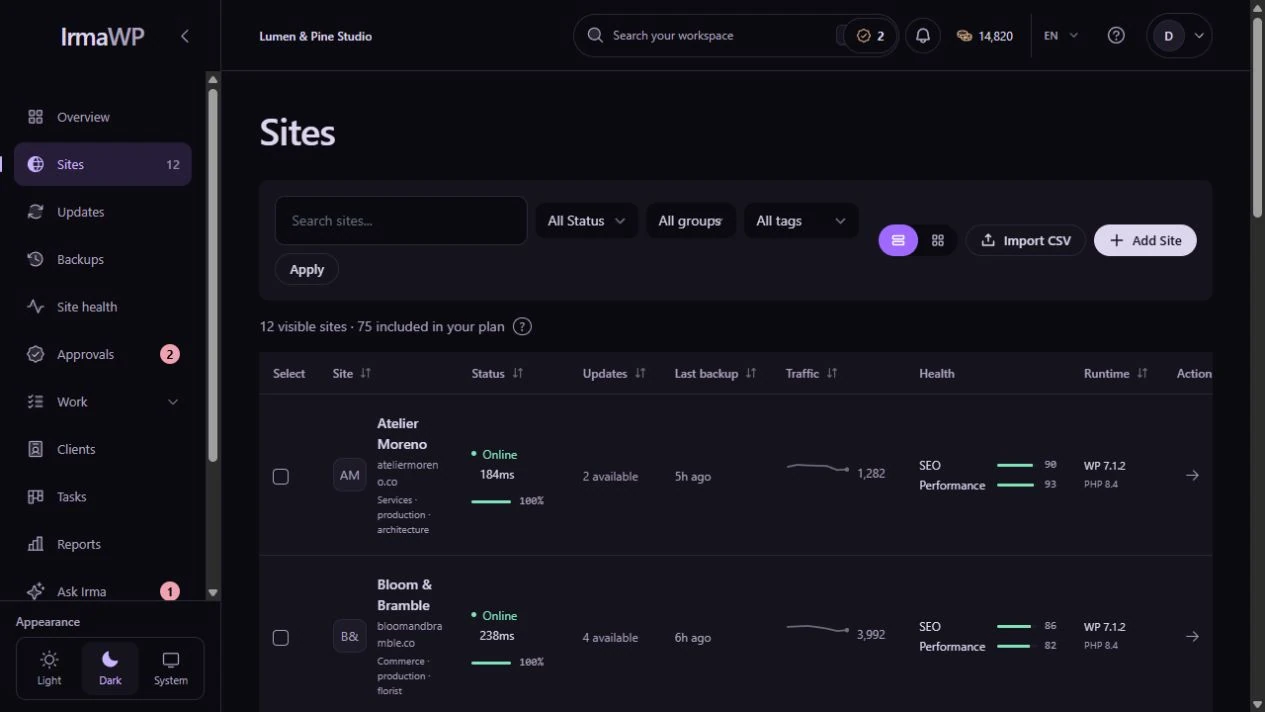
The work, the asking, and the record.
Screens captured from the running app, not interface mockups. The demo workspace includes seeded history. Some tools depend on your plan and the site's connection.
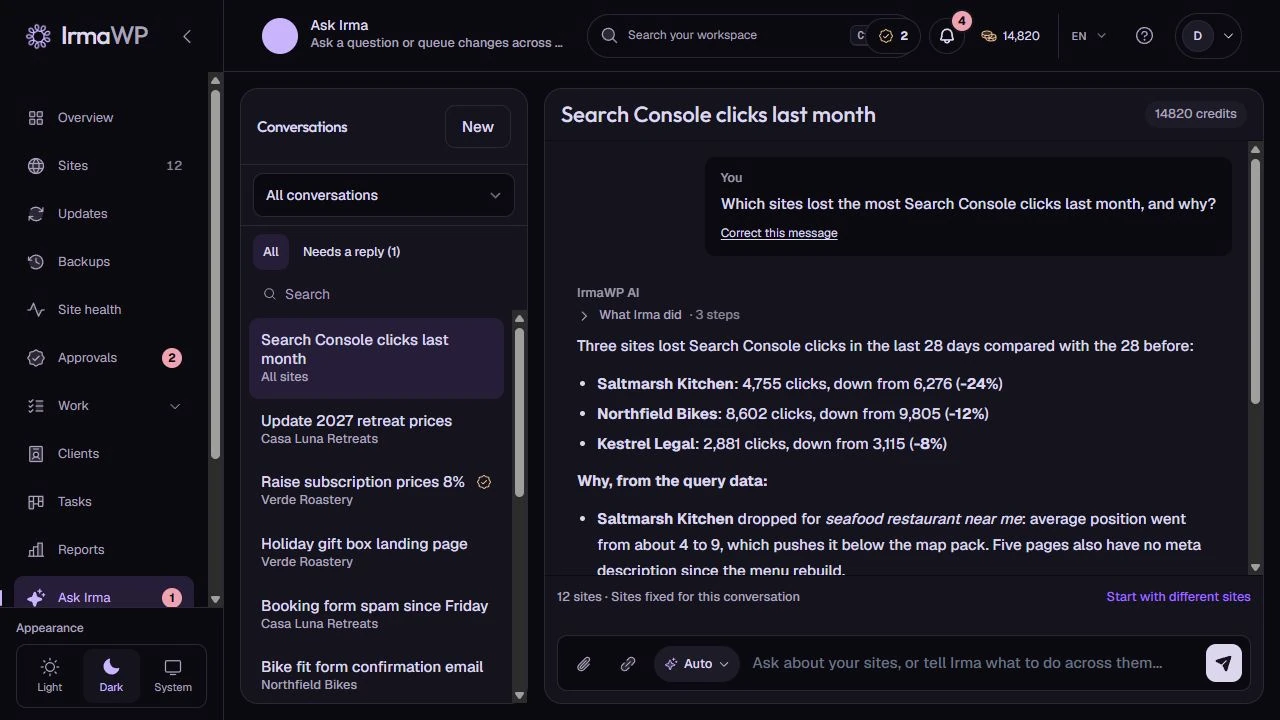
Ask Irma
Ask which sites need attention, investigate a problem or request a change. Choose the sites, set the approval rules and follow the resulting work in the same workspace.
Live Feedback
Clients point to an element on the actual site and send a request with an optional screenshot. The widget creates a task and shares public replies with the portal. Included on every plan; manual feedback uses no AI credits.
Site operations
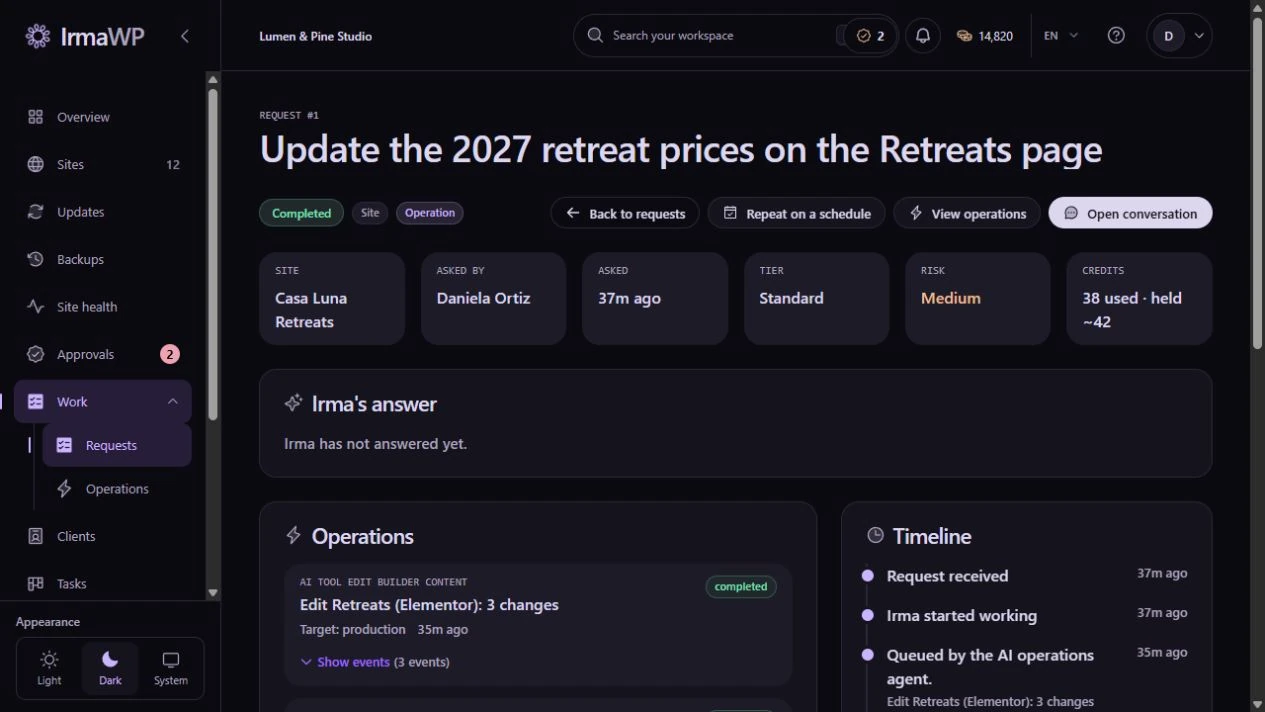
Give WordPress work an explicit target, status and event history. Review queued changes, inspect completed steps and find the sites that still need attention after a partial failure.
Team approvals
Set trust and approval rules per site. Review queued changes and file diffs where available. Staging and rollback depend on the workflow and site policy; a linked staging site must already exist.
Site-level AI work
Update content, investigate code or prepare a page, theme or plugin change. Irma works with the site’s saved brand context and supported WordPress tools, within the access and approval rules you set.
AI conventions for each site
Keep the team's instructions with the site: builder choices, code locations and rules to avoid. Manual conventions stay until you change them; observed conventions can be recorded after a clean AI apply.
Plugin and theme management
Read the installed inventory, filter it, and install from wordpress.org. Authorized team members can activate, deactivate or remove extensions. The connector and active theme are protected.

PHP-error monitoring
Errors collected from connected sites are grouped by site and fingerprint. See recurring fatals, mark resolved issues and follow reopenings. Log collection requires MCP or SSH.
Your staging, linked
Connect a staging site you already host and link it to production. The linked pair counts as one billable site. Configure which work must use staging; IrmaWP does not provision the clone for you.
Your backup destination
Use managed storage or configure a client-owned S3-compatible bucket, including R2. Set the destination and retention policy in the workspace, with site-level overrides when needed.
Reusable recipes
Pro and Agency include custom recipes, workflow schedules and webhooks. Build repeatable work from supported steps, with the same site permissions and safety controls.

Requests
Everything anyone asked Irma, in one list: queued, awaiting approval, running, completed, partly failed, failed. Open one for the per-site operations and their events, who approved what, the credits it took, and a timeline from the first message to the last rollback.

Reporting
Bring completed work, site health and connected analytics into client reports. Review a manual report before sending, or configure scheduled delivery. Keep your agency’s branding on the PDF.
Updates
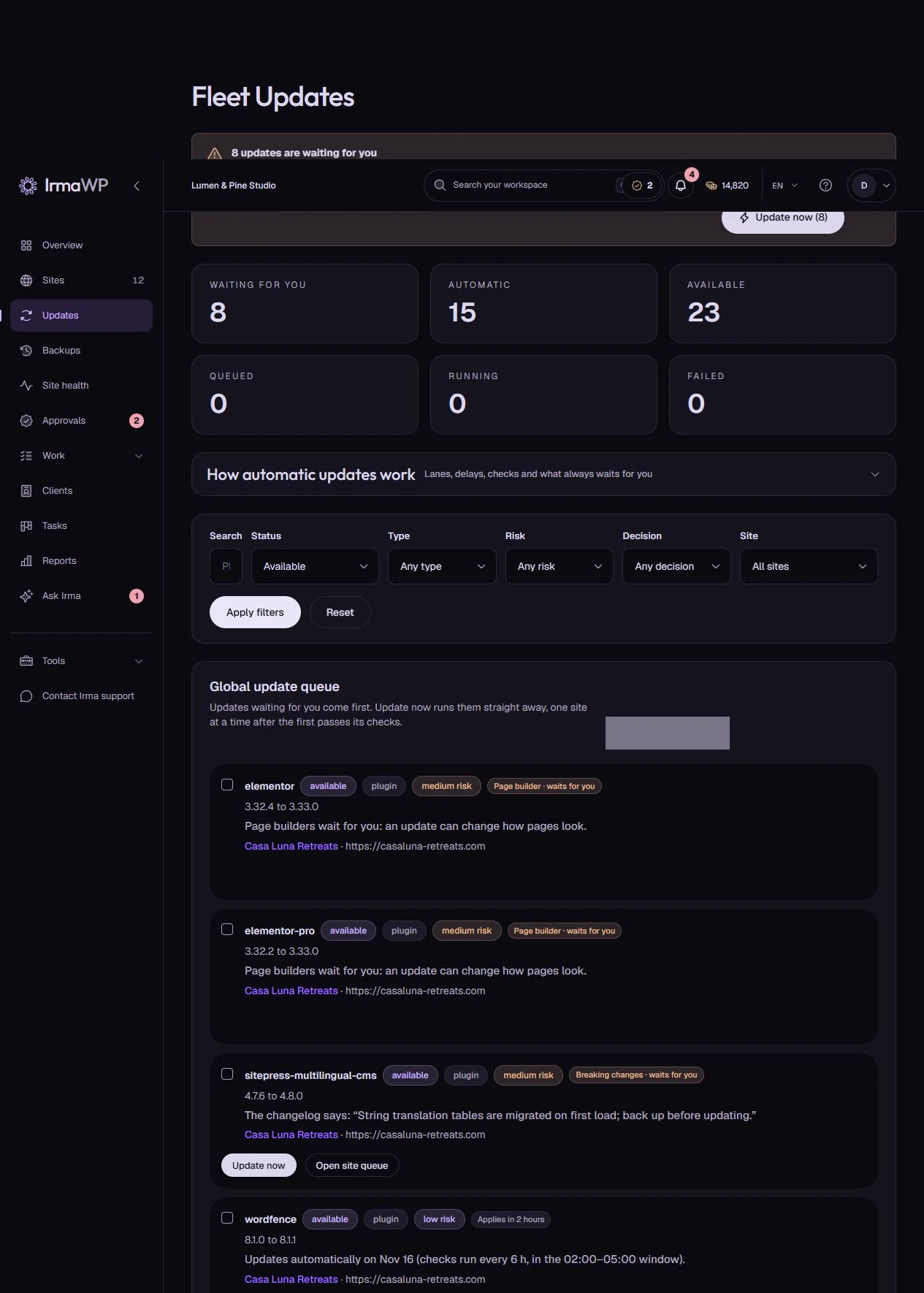
Set update rules for the workspace and override them per site. Security, regular releases and page builders have separate lanes; detected breaking changes wait for a person.
Backups
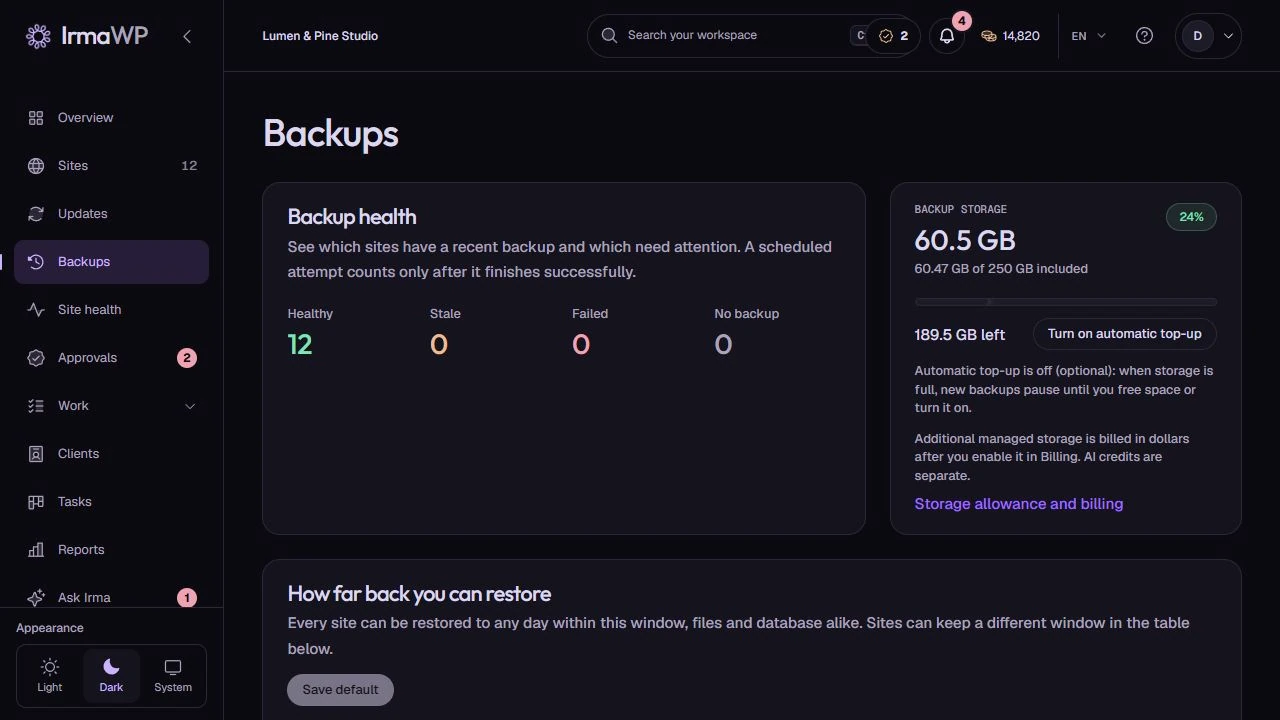
Track files and database backups across your WordPress sites. Set retention, review completed snapshots and choose a restore point when you need it. Use your own destination or your plan’s managed storage.
Security
Review vulnerability findings, file-integrity coverage and basic WordPress hardening across connected sites. Compatible connectors support checks without SSH. A failed or partial scan remains a coverage gap, not a clean result.
Performance
Review stored performance reports and Core Web Vitals where available, then queue a fresh analysis. Missing results stay distinct from a measured score.
Git integration
Browse repositories and branches from supported Git providers. Pro and Agency include repository integration; automated deployments are not available yet.
Uptime monitoring
Track website availability and downtime alerts alongside site health. Start with the fleet overview, then investigate the affected site using its check history and available diagnostics.

Agency white label
Every current plan includes your agency logo and colours on client portals, reports and emails. Agency removes Powered by IrmaWP and adds a verified portal domain and sender identity, plus agency branding on the WordPress plugin.
WordPress site management
Keep your current hosting and connect your WordPress sites. Review availability, updates, backups and health together, then open the site or client that needs your attention.
WordPress client portal
Clients send requests, follow progress, reply and confirm finished work from their own portal. Share reports and optional site metrics while keeping internal notes and team tools private.
Bring your own OpenRouter key
Use the workspace's managed AI credits, or connect your team's own OpenRouter key and pay OpenRouter directly. You do not need a higher plan just to use your own key.
Managed WordPress hosting
Managed WordPress hosting from $9/site/month, with 5 GB included, Cloudflare CDN, SSL, free migrations and human support.
WordPress WaaS for agencies
Deliver a client site from a saved design on your Multisite network. Review the private copy and choose when to publish.
Routine updates move. Risky changes wait for you.
Choose the rules for your workspace, override them per site, or set them when you connect a site. You can require approval in any lane.
Security: act when detected
With automatic security updates enabled, IrmaWP queues detected security releases without waiting for the maintenance window. Breaking changes still require approval.
Regular: wait 3 days
Wait 3 days from first detection to leave room for hotfixes, then use the next update check and any configured maintenance window. A newer version restarts the wait.
Page builders: approve or wait 7 days
Elementor, Divi, Bricks, Beaver Builder, WPBakery and Oxygen wait for approval by default. Choose automatic updates after 7 days from first detection if that fits the site.
Requests arrive where your team works.
From Starter, your agency logo and colours appear on client portals, PDF reports and client emails. The client logo appears alongside yours in the portal and, when uploaded, on the PDF cover. Agency removes the platform attribution and adds a verified portal domain, sender address and agency-branded WordPress plugin.
New request, inside WordPress
Enable the request widget per client and choose their connected sites. WordPress administrators and editors can send a New request from their dashboard straight to your team task backlog. They open the full portal to follow up. Requires an active portal and the connected IrmaWP plugin, version 0.9.51 or newer; SSH or REST alone does not provide the widget.
Client reports and portal downloads
Send one report covering a client’s sites, in their language and your agency’s brand. Include completed work, uptime, security, backups and saved performance measurements. Connect GA4 and Search Console for visitors, top pages and search figures; missing data stays marked as unavailable. Clients can download their reports from the portal.
Breaking changes need a person.
When changelog analysis detects breaking changes, the update waits for a person, regardless of the lane. A failed or rolled-back update in the last 7 days pauses non-security automation on that site. Smoke checks and supported scoped recovery reduce risk; they do not guarantee an unbroken site or automatically restore its live database.
Keep the maintenance work and its follow-up together.
Use the workflow that fits your team. IrmaWP combines fleet operations with site-aware AI assistance.
Scattered across plugins, panels, and separate tabs.
Updates in a maintenance plugin. Backups in a separate service. Uptime alerts in an email thread. AI help in a tab that knows nothing about the site. History reconstructed from memory.
The tools connected, and a way to talk to all of them.
Review site status, inspect a problem and follow supported work through its permissions, approval requirements and operation history. Verify the outcome before calling it complete.
Start with the free workspace.
Connect a few sites, keep the routine work together, and upgrade when the portfolio grows.
- 1 site
- included
- 1,000
- one-time credits
- 2 GB
- backup storage
- $0
- no card, no clock
More evidence for the next decision
Fleet health and trends
Prioritize sites needing attention, then inspect the underlying uptime, backup or security result. Unknown data stays different from a healthy measurement.
Technical SEO audits
Check robots, sitemap and redirect configuration alongside a bounded page sample. Findings help organize work; they are not a full crawl or a search-ranking guarantee.
Design-aware AI work
With the relevant Figma integration configured, inspect design layers, export assets and compare a page against a reference. Human visual and functional review still matters.

