Give clients a place to ask. Keep the work moving.
Clients send requests, follow progress, reply and confirm finished work from their own portal. Share reports and optional site metrics while keeping internal notes and team tools private.
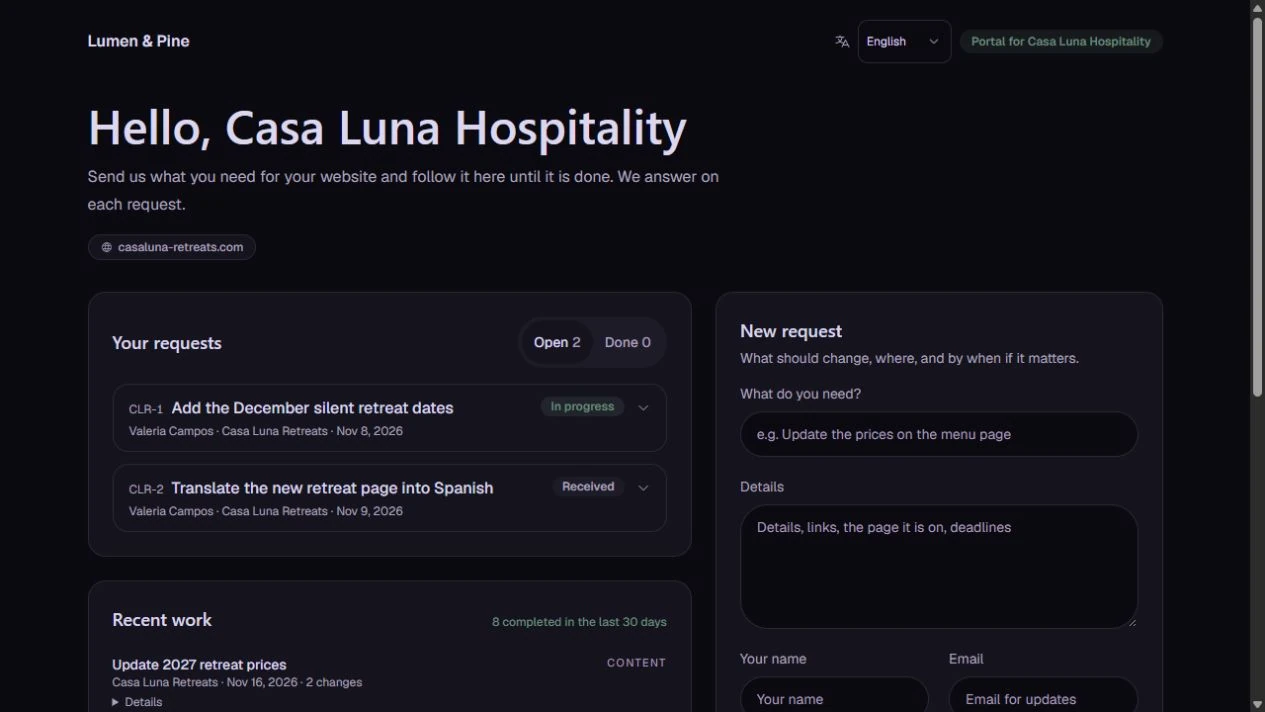
Show the client’s view of the work
This is the actual client portal, not the agency’s request ledger. Clients see their own requests, recent completed work and the sections you enable. The WordPress dashboard widget offers another way to submit a request into the same backlog.
Portals and the task backlog are included on every current plan. Agency adds removal of platform attribution and verified custom portal, sender and plugin branding.
How you use it
Choose the client's scope
Configure the sites and portal access deliberately. A client should only see the information assigned to that portal, not the rest of your agency's workspace.
Show status and work history
Use the supported client-facing overview to explain what is happening. Internal code tools, credentials and billing details belong in the team workspace.
Collect a service request
Enable the request widget per client and choose their connected sites. WordPress administrators and editors can send a New request from their dashboard straight to your team task backlog. They open the full portal to follow up. Requires an active portal and the connected IrmaWP plugin, version 0.9.51 or newer; SSH or REST alone does not provide the widget.
What to know
Which plans include the client portal?
Can clients approve work?
Does the portal deliver downloadable reports?
Who can use the WordPress request widget?
Your brand, on every plan
Your agency on the left. Your client on the right.
Portals and the task backlog are included on every current plan. Agency adds removal of platform attribution and verified custom portal, sender and plugin branding.
- Every current plan: your logo and colours on portals, reports and client emails
- Client logo alongside yours in the portal and uploaded PDF cover
- Agency: no platform attribution, your domain, sender and plugin
Installed plugin
Northline Site Care
By Northline Studio
Website care, managed by the team you know.
Northline Studio
Your website care team
Good morning, Alex.
Your website’s status and recent work, in one place.
Starter / Pro example · Powered by IrmaWP
Northline Studio
New request for your website
Name, email and site are filled in from WordPress.
View requests in the full portalIllustration only. This form does not send requests.
Northline Studio
To: Alex · Client
Your website report is ready.
Hi Alex,
Here’s the latest work on your website. Your report is attached to this email.
Your team at Northline Studio
Illustrative branding previews. Northline is an example agency.
Start with your own sites.
Connect a small portfolio, check the tools you need, and choose the plan that fits your team's work.

