Ask about your sites. Keep the work in context.
Ask which sites need attention, investigate a problem or request a change. Choose the sites, set the approval rules and follow the resulting work in the same workspace.
One question across your portfolio
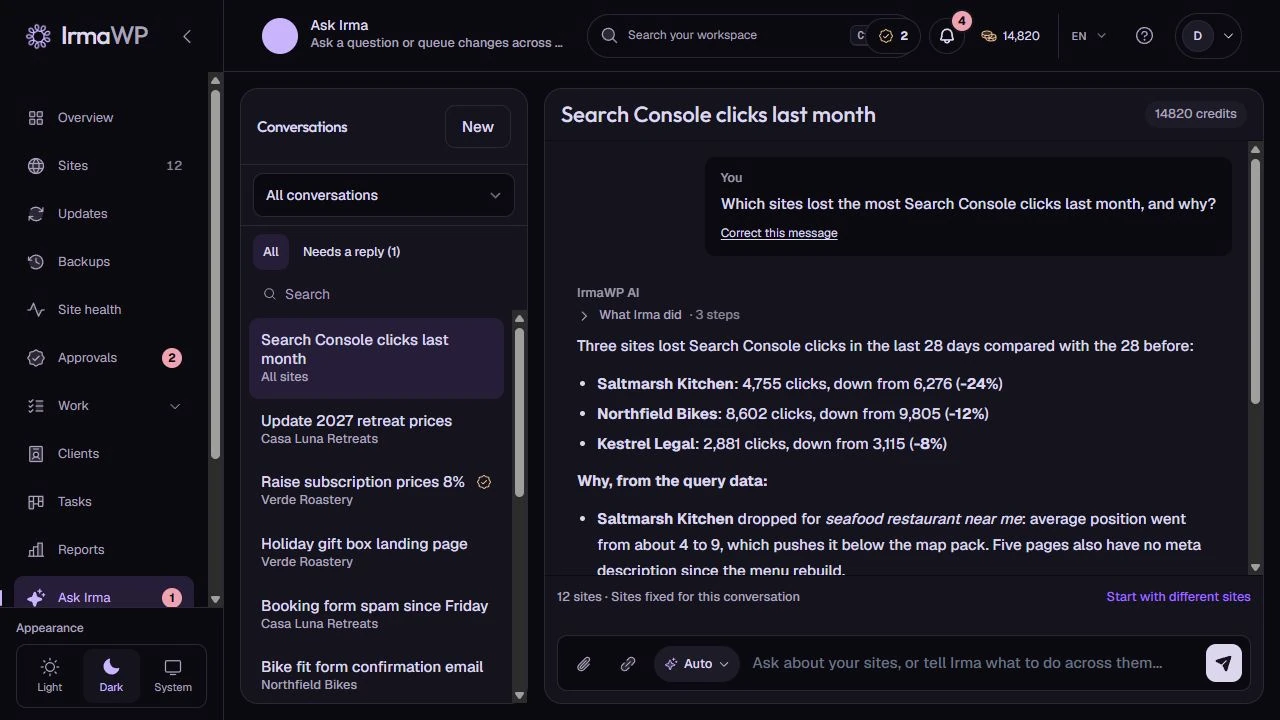
This demo asks Irma to compare imported Search Console data across twelve sites. The conversation keeps its selected sites and the steps behind the answer together. Connected data sources determine what Irma can inspect.
An answer can help you decide what to do. A site change has its own operation status and checks.
How you use it
Choose the scope
Select the sites before starting a fleet request. A question about installed plugins and an instruction to install one are different kinds of work, with different permissions.
Review the proposed work
Changes pass through the workflow's risk and approval rules. Some actions need a review, a suitable connection or an already linked staging installation.
Follow the result
Use the request record to check each site's outcome. A partially failed fleet request should not hide the sites that still need attention.
What to know
Can Irma do anything I can describe?
How is AI billed?
Start with your own sites.
Connect a small portfolio, check the tools you need, and choose the plan that fits your team's work.

